
How to Build a Voice AI Agent: A Complete Guide (2026)
How to build a voice AI agent, from the no-code build process to integrating with your existing dialer, use cases, pricing, and getting started.
IN this article

Evolve with Sigma Mind AI
Build, launch & scale AI agents
Quick Summary
AI voice agents are most effective in customer support, where they handle high-volume Tier-1 queries efficiently, and in sales, where they excel at outbound outreach and lead qualification rather than closing deals. They also deliver significant operational improvements by assisting human agents instead of replacing them.
While challenges such as speech recognition errors, hallucinated responses, and repetitive caller loops exist, these can be minimized with the right guardrails. In practice, the best outcomes come from a hybrid model that combines AI automation with human oversight.
You build a voice AI agent by cloning a template in a no-code builder, defining its conversation flow and persona, testing it in a simulator, and then layering it onto the dialer or CRM you already run instead of replacing your infrastructure. The full process, from first build to production, typically takes days, not months.
This guide covers the actual build, not just the theory: what a voice AI agent does, how to build one without writing code, how it plugs into a dialer you already run, and what it costs to keep live.
Build Your First Voice Agent Free
SigmaMind AI lets you build and test a voice agent in the Playground at no cost. You only pay once it's handling live conversations.
What is a voice AI agent?
A voice AI agent is software that holds a real, two-way phone conversation and takes action on what it hears, not an IVR menu or a chatbot with a phone number attached to it. A well-built agent can:
- Answer inbound calls and route them by intent, not a keypad menu
- Make outbound calls for sales, collections, or follow-ups
- Trigger real actions: issuing refunds, updating a CRM, booking a calendar slot, pulling account data
- Hand off to a human agent with full context when a call needs judgment a script can't provide
Most platforms in this category aren't limited to voice either. The same agent, built once, usually runs across voice, chat, and email, which matters for teams that don't want to rebuild the same logic three times over.
How do you build a voice AI agent without writing code?
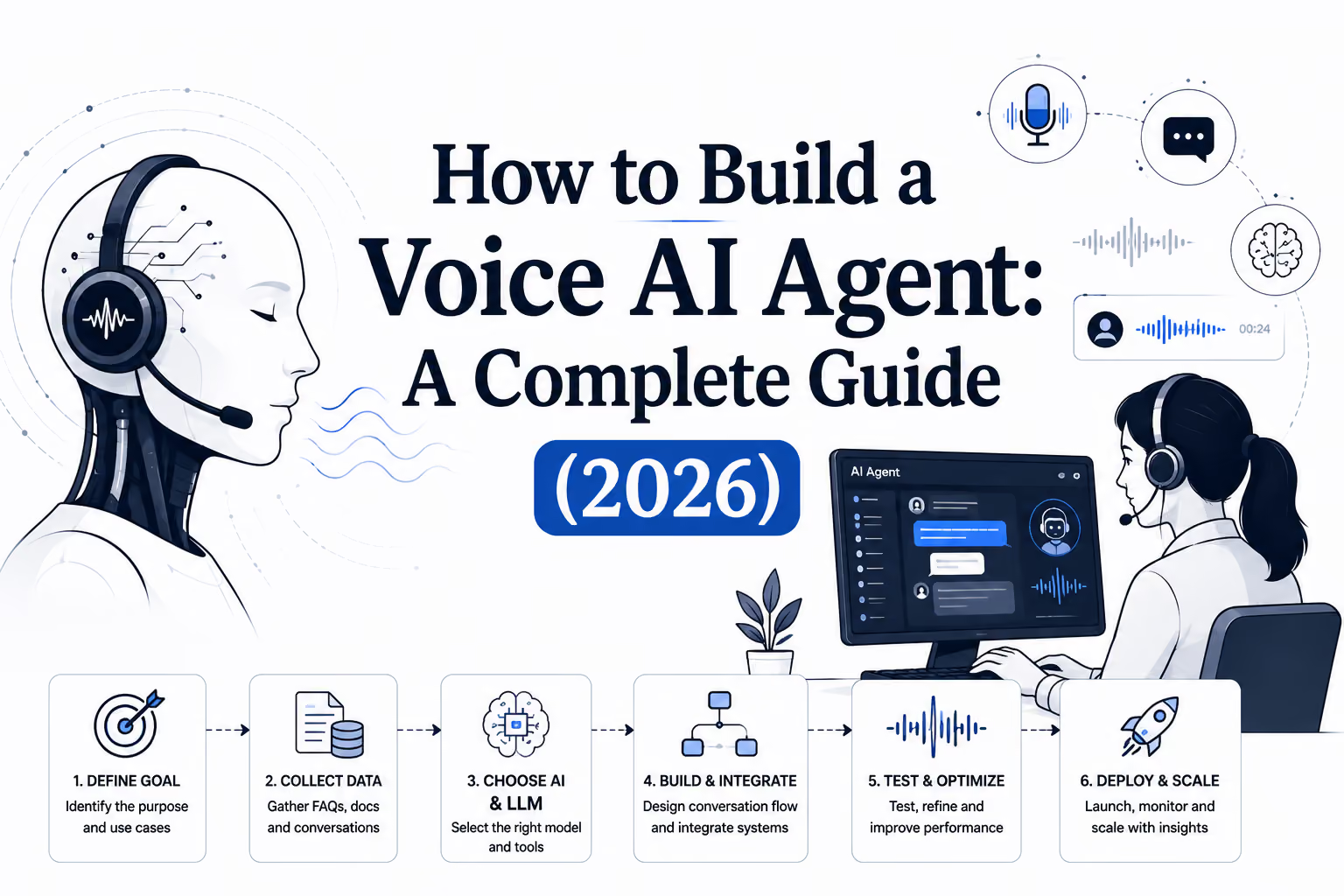
You build one in a no-code agent builder using five steps: clone a template, build the conversation flow, set the persona, test it in a simulator, then launch.
- Clone a template: Start from an FAQ agent, a scheduler, or a lead-qualification bot instead of a blank canvas.
- Build the flow: Add event triggers, intents, branches, and app actions with a drag-and-drop builder rather than raw code.
- Set the persona: Tone, verbosity, and escalation behavior get defined once and apply across every channel the agent runs on.
- Test it in a simulator: A playground environment lets you run through conversations and catch edge cases before a real caller does.
- Launch and monitor: Track resolution rates, deflection, and cost per conversation once it's live.
Developers who want more control aren't locked out. Most platforms support webhooks and custom API calls for teams that need to pull data from a system the app library doesn't cover, or trigger a workflow in another tool entirely. The no-code builder covers most of what a team needs; the API layer handles what doesn't fit a template.
How do you integrate voice AI with your existing dialer?
You integrate voice AI with an existing dialer by layering it on top of your current telephony and CRM via a media bridge, rather than replacing the infrastructure outright. The AI handles the conversation while your existing systems keep doing call routing, logging, and reporting the way they already do.
This is usually the question that decides whether a voice AI project actually launches. Ripping out a working dialer and replacing it with something new is slow, risky, and rarely necessary. The approach for adding AI voice agents to VICIdial without replacing your infrastructure walks through exactly how that integration works, from the media bridge to the handoff logic.
What are the best use cases for a voice AI agent?
The use cases seeing the most real-world traction share one trait: repetition. Calls that follow a predictable pattern, even a complex one, are the ones worth automating first.
Trying to automate every use case at once is usually where these projects stall. Pick the single call type causing the most pain right now, whether that's after-hours coverage or a lead response time that's losing pipeline, before expanding further.
How is this different from other voice AI platforms?
The main difference is architecture: platforms built voice-first handle real phone conversations better than platforms built as chat tools with voice added later. A lot of platforms in this space started as chat products, and that shows up as noticeably worse latency and less natural conversation flow on an actual call.
SigmaMind AI was built voice-first, with chat and email added around it rather than the other way around, and it's designed to layer onto infrastructure teams already run instead of forcing a full migration. That distinction matters most in the first few seconds of a call, where a pause that would go unnoticed in a chat window becomes an obvious, awkward gap on the phone. The detailed comparison against Parloa breaks down where that voice-first architecture shows up in practice, on things like latency and setup time.
What does it cost to build and run a voice AI agent?
Building a voice AI agent should cost nothing until it's actually doing work. The fairer, more common pricing model charges usage-based fees tied to live conversations, not a flat monthly fee for a platform sitting unused while it's being built and tested.
Gartner has predicted that 40% of enterprise applications will feature task-specific AI agents by 2026, up from less than 5% the year before, which is a big part of why usage-based pricing has become the norm rather than the exception. source
That shift matters because it changes what a fair pricing conversation looks like. A platform charging a flat monthly fee regardless of call volume is betting you'll pay whether or not the agent is actually earning its keep. Usage-based pricing ties cost directly to value delivered: more live conversations means more automated resolutions, and the bill reflects that instead of a fixed number picked to cover a worst-case scenario.
The real number to watch isn't the per-minute rate on a pricing page. It's the total cost once telephony, the underlying speech and language model usage, and any human oversight are added on top of the platform fee, since that's where a deceptively low headline price can end up costing more than expected. The full cost breakdown of an AI call center covers what that adds up to once telephony and compute are counted alongside the platform fee.
Getting started with your voice AI agent
Start with one use case, not the whole call center. Clone a template close to what you need, build the flow, and test it in a simulator before it ever touches a real caller. Once that one call type is handled well, expanding across channels and to the next use case is a much smaller lift than the first build.
Bottom line: Building a voice AI agent takes a no-code builder, a template close to your use case, and a simulator to test it in, not a development team. The harder decision isn't the build; it's picking the one call type worth automating first.
Ready to see how voice AI technology, SigmaMind, handles your calls? Talk to the team or start building for free to test it yourself, on a real call type, not a scripted demo.
Evolve with Sigma Mind AI
Build, launch & scale AI agents
Related Blogs
Ready to transform your call center?

More Conversations.
Less Manual Work.

Building from San Francisco, CA