
Connect Shopify to Your Voice AI Agent in One Click | SigmaMind
SigmaMind now lets you connect Shopify to your Voice AI agents in a single click. Access customer and order data in real time, handle post-purchase conversations, log interactions automatically, and build voice agents for ecommerce operations.

IN this article

Evolve with Sigma Mind AI
Build, launch & scale AI agents
Shopify Voice AI Integration for Phone Support
SigmaMind AI can use Shopify customer, order, and fulfillment lookups during phone-support calls. Setup requires a Shopify custom app, appropriate read-only Admin API permissions, and its access token in SigmaMind AI Integration Auth—not a one-click connection. Configure caller verification and human handoff in the phone flow before using order details in a live conversation.
Why Did We Build a Shopify Voice AI Integration?
Shopify order questions are a practical use case for AI contact center automation because an agent can look up the information needed to answer them during a call.
For stores with substantial phone-support volume, recurring questions include:
- “Where is my order?”
- “What did I order last time?”
- “Has my order been fulfilled?”
Shopify holds the order information, but a caller should not have to wait while a support representative checks it manually.
We built the Shopify integration so a configured voice agent can look up relevant store records during a call, answer supported questions, and hand off cases that need a person.
What Can Voice AI Do With Shopify Data?
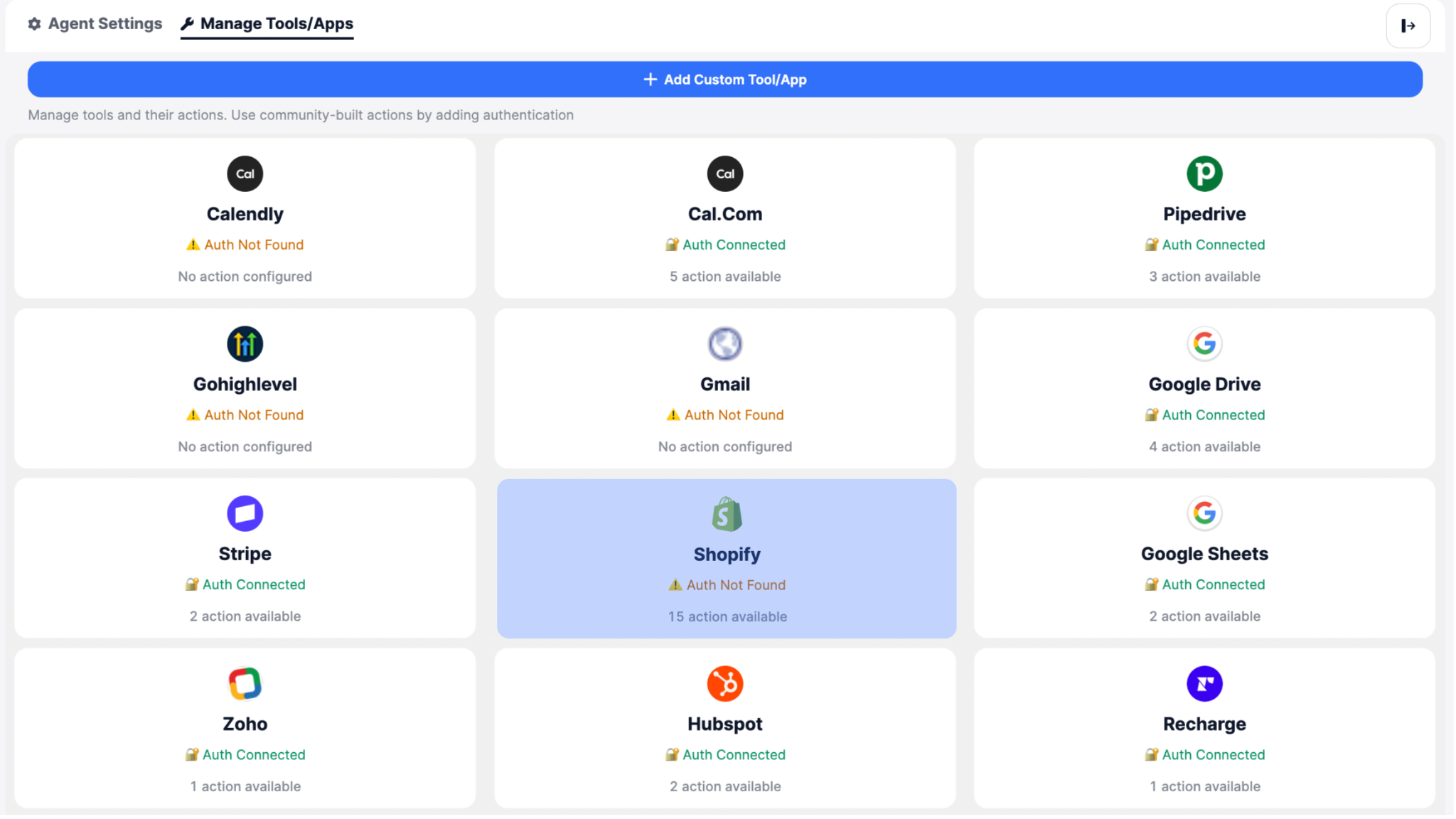
To connect Shopify, create a Shopify custom app, grant the read-only Admin API scopes needed for the intended lookups, and enter its access token in SigmaMind AI Integration Auth. Then configure the voice agent to use the Shopify tool during calls. See the Shopify integration guide for setup details.
How Does Voice AI Access Shopify Customer and Order Data?
With the appropriate access and a configured tool, the agent can look up:
- customer information
- accessible orders and order details
- fulfillment information
A lookup can inform an answer when the requested record is accessible; missing data, API errors, or questions outside the configured flow should lead to a human handoff rather than a guessed answer.
How Can Voice AI Automate Post-Purchase Conversations?
For post-purchase calls, a SigmaMind AI agent can use supported Shopify lookups to:
- use phone or email to find a possible customer record, then verify the caller before disclosing order details
- respond to questions supported by accessible order and fulfillment data
- route requests that need account changes or other human action
Configure and test the caller-verification step in the phone flow; a phone or email match alone does not authorize disclosure.
How Does Voice AI Reduce Ecommerce Support Workload?
Instead of agents checking dashboards mid-call, your voice agent can:
- answer supported order and fulfillment questions after caller verification
- identify requests the configured lookup cannot resolve
- route those calls to a person with conversational context
You can reserve human support time for requests that require a judgment call or an action the Shopify lookup cannot perform.
How Do You Build Voice AI Agents for Ecommerce Operations?
For phone support, configure the agent's Shopify lookup, verification step, and handoff conditions around the calls your team receives:
- use accessible order and fulfillment data for status inquiries
- transfer account changes or unsupported requests to a person
- test what happens when Shopify returns no match or an error
These lookups support phone conversations about existing orders; they do not add a voice interface to the Shopify storefront.
Voice AI Ecommerce Use Cases
The following examples show how you could use Shopify lookups in ecommerce phone support. Configure your phone routing and escalation path separately.
1) Order Status & Delivery Agent
Your agent can:
- find a possible customer and verify the caller before sharing details
- look up an accessible order and its fulfillment information
- report only the status available in the returned data
- transfer the call if the record is unavailable or the question needs a person
Some calls will still need a human agent.
2) Customer Support Voice Agent
When customers call with questions:
- the agent looks up permitted customer and order information after verification
- the phone flow handles a missing record, API error, or unsupported request
- configured transfer triggers route the caller to a human agent
For a human handoff, configure the transfer destination and trigger, then test the recipient's context delivery. SigmaMind AI's Transfer Call guide describes warm transfer with a private whisper summary and optional SIP headers; these do not, by themselves, update a Gorgias record.
3) High-Volume Sales Periods
During launches or seasonal spikes:
- a voice agent answers supported order questions when records are available
- a human representative handles exceptions and unsupported requests
Test lookup failures and transfer routing before using the flow for seasonal call surges.
You can review conversations using SigmaMind AI’s voice and chat analytics; this is separate from writing call outcomes to Shopify.
What Should Teams Check Before Using Shopify Voice AI for Phone Support?
SigmaMind AI uses the Shopify connection for supported data lookups during calls, not for changing store records.
Before taking live calls, check the custom-app scopes and token, caller verification, supported lookups, and the phone flow's error and transfer paths:
- use read-only scopes for the customer, order, and fulfillment lookups you need
- test inaccessible or older orders, missing matches, and API errors
- configure when to route or warm-transfer a caller and what context the recipient receives
Gorgias is a separate integration: its documented synchronization covers macros, tags, rules, and FAQs, not native ticket creation or automatic call-summary writing. For broader evaluation, see our Shopify voice AI platform comparison and Shopify, Recharge, and Gorgias phone-support guide.
Try Shopify + SigmaMind AI
If you’re already building voice agents on SigmaMind AI, open the App Marketplace and follow the Shopify integration guide to set up the custom app, read-only permissions, and access token.
And if you’re new here: SigmaMind AI lets you build and test voice agents for your phone-support workflows, including Shopify lookups and configured human handoffs.
Explore the SigmaMind AI voice platform and build a phone-support flow around the store data your agent is permitted to access.
Evolve with Sigma Mind AI
Build, launch & scale AI agents
Related Blogs

Ready to transform your call center?

More Conversations.
Less Manual Work.

Building from San Francisco, CA