
Introducing the SigmaMind MCP Server for AI Coding Assistants
Learn how the SigmaMind MCP Server enables Cursor, VS Code, Copilot, and other AI coding assistants to access our APIs and build voice & chat AI integrations faster.
.avif)
IN this article

Evolve with Sigma Mind AI
Build, launch & scale AI agents
Developers are changing how software gets built.
Instead of manually reading documentation, figuring out endpoints, and wiring APIs line by line, many developers now start by asking an AI coding assistant to help them build the integration.
To support this workflow, SigmaMind now provides an MCP server based on the Model Context Protocol - a standardized protocol that allows AI assistants to discover tools and interact with external systems.
With the SigmaMind MCP Server, AI coding assistants can directly access SigmaMind’s API documentation and reference materials, helping developers integrate conversational and voice AI capabilities faster. Let's dive into this further.
Why MCP matters for AI Coding Assistants
Modern AI development environments are becoming more powerful. Tools like Cursor IDE, Visual Studio Code, and GitHub Copilot now allow developers to connect MCP servers that provide external knowledge and tools.
This means your AI assistant can:
- Search SigmaMind API documentation
- Discover available endpoints and parameters
- Retrieve authentication guidance
- Access real-time documentation updates
- Generate working integration code for SigmaMind APIs
- Troubleshoot API implementation issues
The assistant automatically references the MCP server and returns accurate implementation guidance.
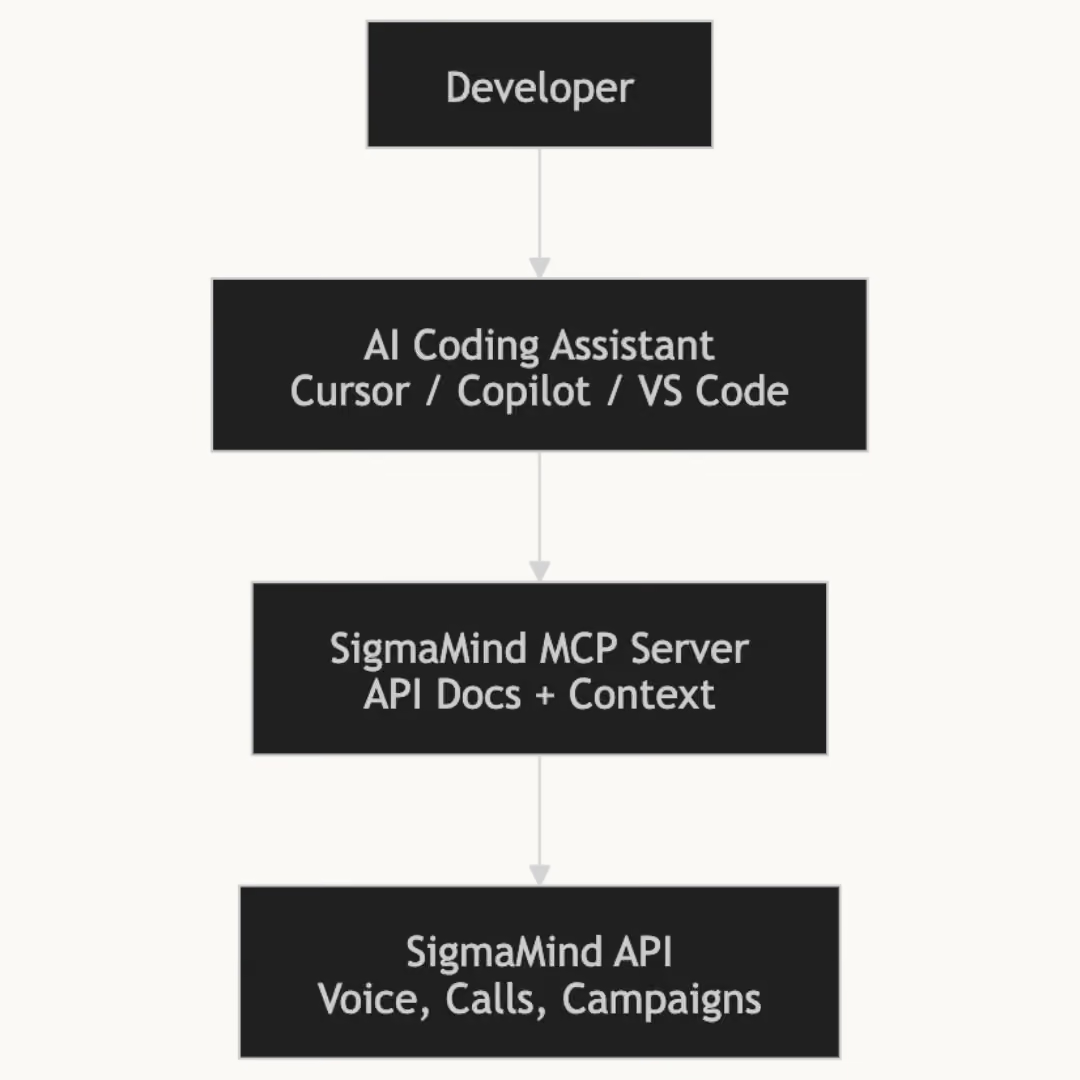
--> Make sure to choose the right platform with our Comparison of the best AI Agent Builders currently used.
Access the Full SigmaMind API
The MCP server exposes the SigmaMind API structure to AI assistants, including endpoints for:
Calls
Create phone calls, retrieve call details, list call history, or delete calls programmatically.
Chats
Create chats, generate chat completions, retrieve chat sessions, update conversations, and end chats.
Phone Numbers
Provision new phone numbers, import existing ones, retrieve configurations, update settings, and manage number infrastructure.
Campaigns
Create and manage campaigns programmatically, retrieve campaign data, update configurations, or delete campaigns.
Webhooks
Register webhooks and receive real-time event updates across SigmaMind workflows.
With these APIs, developers can build integrations that automate communication workflows, calling systems, and conversational experiences.
--> Learn more details in the SigmaMind developer docs
What the SigmaMind MCP Server makes possible
The SigmaMind MCP server gives AI coding assistants structured access to the SigmaMind API.
Instead of manually searching documentation, copying endpoint examples, and wiring integrations yourself, your coding assistant can now retrieve that information directly from SigmaMind in real time.
This allows developers to move much faster from exploring an API to building a working integration.
Once connected, your assistant can:
Access the SigmaMind API documentation in real time
Your coding assistant can browse and search the complete SigmaMind API documentation without leaving your development environment.
Retrieve endpoint references instantly
Assistants can understand available endpoints, parameters, and request structures for features like calls, chats, campaigns, phone numbers, and webhooks.
Generate integration code using correct API parameters
Instead of manually constructing requests, your assistant can generate working API calls based on SigmaMind’s latest documentation.
Follow correct authentication patterns
Assistants can reference SigmaMind’s authentication methods and help implement API keys securely in your integrations.
Debug and troubleshoot integrations
If an API request fails, your assistant can reference error handling documentation and help identify the issue.
Stay synced with the latest documentation
Because assistants reference the MCP server directly, they always work with the most up-to-date API documentation.
Together, these capabilities make it easier for developers to build reliable integrations with the SigmaMind platform.
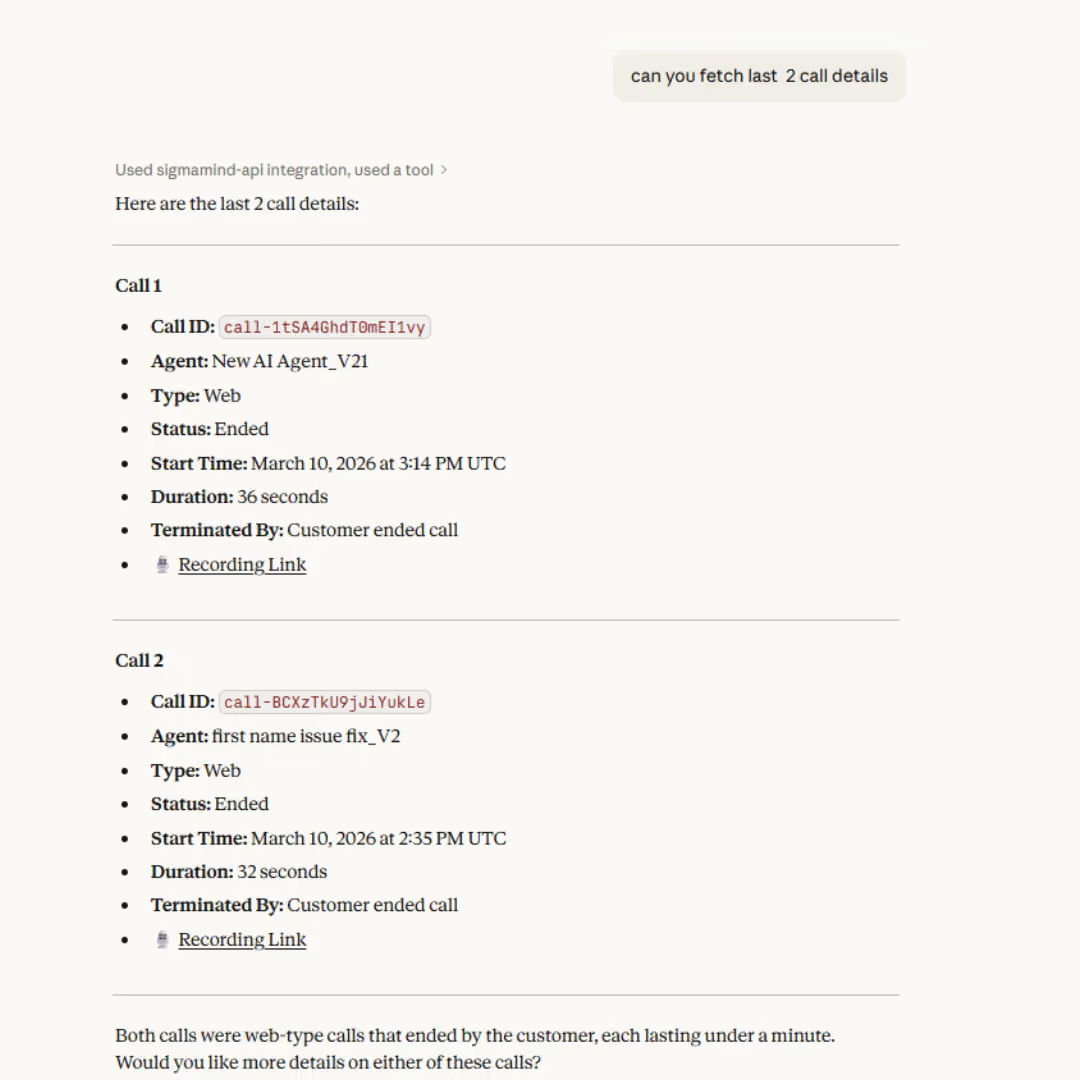
Works with Modern AI Coding Assistants
The SigmaMind MCP server works with many of today’s most popular AI-powered coding environments.
Developers can install the server and immediately allow their coding assistants, including:
- Cursor IDE
- Claude Code
- Visual Studio Code
- GitHub Copilot
- OpenAI Codex
- Gemini CLI
- Windsurf
- Antigravity
- Kiro
Once installed, your assistant can browse SigmaMind API documentation, retrieve endpoint details, generate integration code, and help troubleshoot API requests.
Faster Integrations for Voice and Conversational AI
SigmaMind is designed to help teams build and deploy conversational and voice AI agents across channels. Integrating these capabilities into existing applications often requires referencing multiple endpoints, authentication patterns, and configuration steps.
The MCP server helps simplify that process by giving AI coding assistants direct access to SigmaMind’s latest API documentation and examples.
Developers can move from idea to implementation faster, while reducing the time spent searching for the right documentation or troubleshooting integration issues.
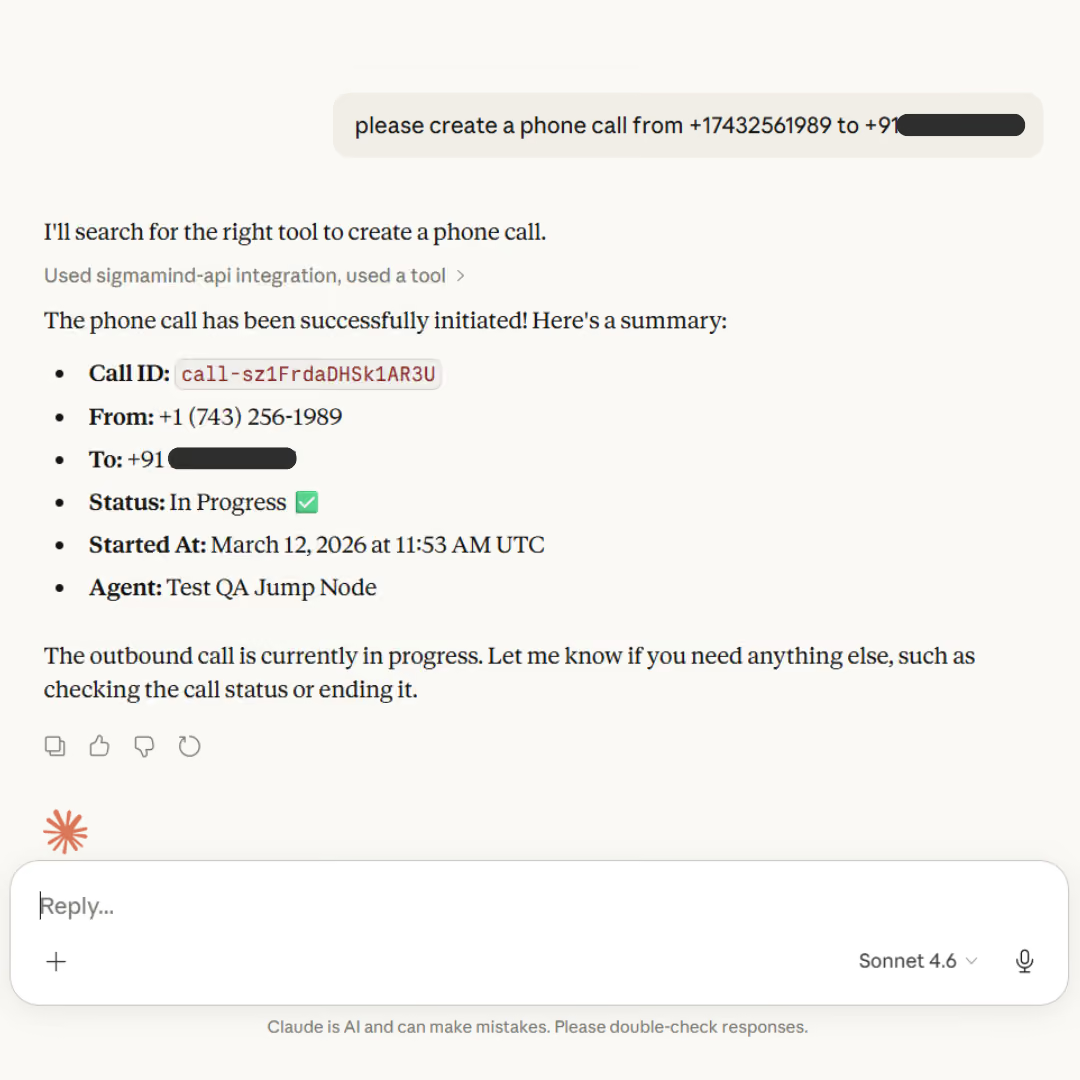
What this easy integration means for Businesses
For businesses building customer-facing AI systems, faster developer workflows mean faster product delivery.
Teams can prototype, test, and deploy conversational AI capabilities more quickly, including:
- Voice AI workflows
- Outbound calling integrations
- AI-driven customer engagement systems
- Automated communication pipelines
By making the SigmaMind Voice AI platform easier to integrate with modern development environments, the MCP server helps teams bring AI-powered experiences to production faster.
How to Install the SigmaMind MCP Server
For most environments, installation simply requires adding the SigmaMind MCP server URL to your assistant’s MCP configuration under: https://api.sigmamind.ai/mcp
After connecting the server, your AI coding assistant can immediately begin referencing SigmaMind’s API documentation and endpoints.
The Future of AI-Assisted Development
AI coding assistants are quickly becoming a standard part of the development stack. Instead of working alone with documentation and APIs, developers are increasingly collaborating with AI tools that help them explore, build, and debug software systems.
The SigmaMind MCP Server is our step toward supporting this new way of building. Try it for free!
Evolve with Sigma Mind AI
Build, launch & scale AI agents
Related Blogs
Ready to transform your call center?

More Conversations.
Less Manual Work.

Building from San Francisco, CA