
HubSpot Voice AI Integration: Connect HubSpot to Your AI Agents in One Click
Connect HubSpot to your voice AI agents in one click. Automate CRM updates, qualify leads, and trigger workflows during live calls with SigmaMind.
.avif)
IN this article

Evolve with Sigma Mind AI
Build, launch & scale AI agents
Teams using HubSpot often rely on it as their system of record for sales, support, and customer success. But most workflows still depend on manual updates or disconnected automation.
With SigmaMind’s HubSpot voice AI integration, agents can fetch CRM data, update records, and trigger workflows in real time during live conversations.
HubSpot is now available as a pre-built integration inside the SigmaMind App Marketplace.
And you can connect it to your voice agents in a single click.
No complex workflows. No custom setup. No switching screens.
Why Do You Need HubSpot Voice AI Integration?
Builders can connect apps using custom tools, in whichever platform they’re building on - but often:
- integrations live in a separate screen
- there is no “one-click” experience for popular CRMs
- teams are required to manually set up HubSpot actions to do basic tasks
But the reality is simple:
Your voice agents shouldn’t just talk.
They should be able to take actions inside your CRM, the same way a human agent does.
With the SigmaMind App Marketplace, HubSpot becomes a plug-and-play capability for every developer and business building on SigmaMind.
What Can You Do with HubSpot + Voice AI Integration?
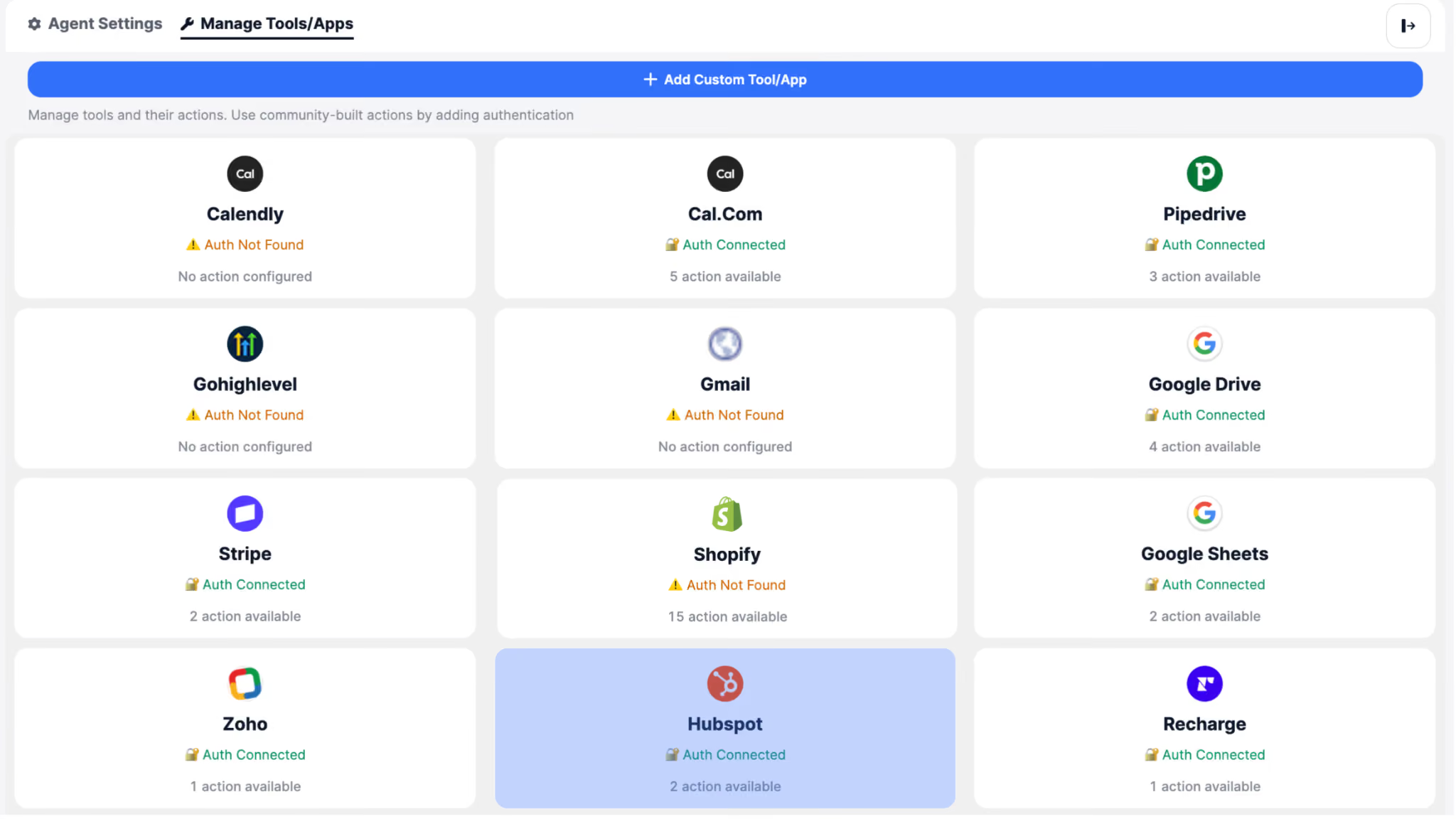
Once connected, your voice agent can instantly use HubSpot as a tool during live calls.
Your agent can look up:
- Contacts
- Companies
- Deals
- Lead information
- Previous engagement history (where applicable)
So instead of guessing, the agent can respond with full context.
Example:
“I can see you spoke to our team last week about pricing - are you calling to continue that conversation?”
Update HubSpot automatically during calls
Your agent can:
- log call outcomes
- update contact details
- add notes to records
- update deal stages
- attach conversation summaries
Meaning every call becomes structured CRM updates - without a human manually doing data entry.
Build sales + support agents that actually complete the workflow
Instead of your voice agent just collecting information and handing it off…
It can complete actions like:
- Update lead status (New, In Progress, Attempted to Contact…)
- Qualify inbound leads
- Tag and score contacts
- Trigger follow-ups
This is where Voice AI becomes operationally useful, not just conversational.
What Are the Best Use Cases for HubSpot Voice AI Agents?
1) Inbound Lead Qualification Voice Agent
Your agent answers calls, captures intent, and updates HubSpot automatically:
- Finds contact (or creates one)
- Asks qualifying questions
- Updates lead fields
- Creates an activity + summary note
- Moves deal stage forward
No rep needed for the first touch.
2) Sales Follow-Up Agent
Your agent can handle warm follow-up calls like:
- “Are you still evaluating solutions?”
- “Would you like a demo this week?”
Then:
- updates HubSpot notes
- tags the outcome (interested / not now / wrong person)
- alerts your team
Keeps your pipeline active without manual calling.
3) Customer Support Voice Agent
When a customer calls support, your agent can:
- identify them instantly via phone/email
- pull CRM context
- log the issue + resolution summary
- assign the right next step
Better CX + faster triage.
Why Does HubSpot Integration Matter for Voice AI Developers?
SigmaMind is built for teams that want to ship fast.
With pre-built integrations in the marketplace:
- you don’t waste time writing CRM glue code
- you don’t manually maintain HubSpot API calls
- you can ship production-ready voice workflows in minutes
It’s the difference between:
“Our agent can talk to customers”
and
“Our agent can actually do the job.”
How to Connect HubSpot to Voice AI Agents
If you’re already building voice agents on SigmaMind - open the App Marketplace and connect HubSpot in one click.
And if you’re new here: SigmaMind lets you build and deploy production-ready Voice AI agents with ultra-low latency, tool calling, and integrations - without the complexity.
Evolve with Sigma Mind AI
Build, launch & scale AI agents
Related Blogs
Ready to transform your call center?

More Conversations.
Less Manual Work.

Building from San Francisco, CA