
Cal.com Voice AI Integration: Connect Cal.com to Your AI Agents in One Click
Learn how to connect Cal.com to your voice AI agents in one click using SigmaMind. Check real-time availability, book or reschedule meetings during live calls, and automatically turn conversations into confirmed calendar events—without sending links or manual follow-ups.
.avif)
IN this article

Evolve with Sigma Mind AI
Build, launch & scale AI agents
Teams using Cal.com rely on it for flexible, developer-friendly scheduling. But booking workflows still depend heavily on links and manual interaction.
With SigmaMind’s Cal.com voice AI integration, agents can check availability, book meetings, and reschedule appointments in real time during live conversations.
With this integration, scheduling is no longer something a lead has to click through, it happens naturally in the flow of the conversation.
Why Do You Need Voice AI for Cal.com Scheduling?
Cal.com isn’t built to be “just another scheduling link.” It’s designed to be a flexible, extensible scheduling platform that integrates with calendars, workflow tools, booking flows, and custom business logic.
Teams choose Cal.com because:
- It’s open-source and developer-friendly
- It can be self-hosted or cloud-managed
- It integrates with calendars and tools you already use
But even teams with powerful scheduling infrastructure hit the same friction point:
High-intent conversations still happen over voice - not text or email.
This integration provides a way for your phone interactions to leverage Cal.com’s scheduling power in real time.
What Can You Do with Cal.com + Voice AI?
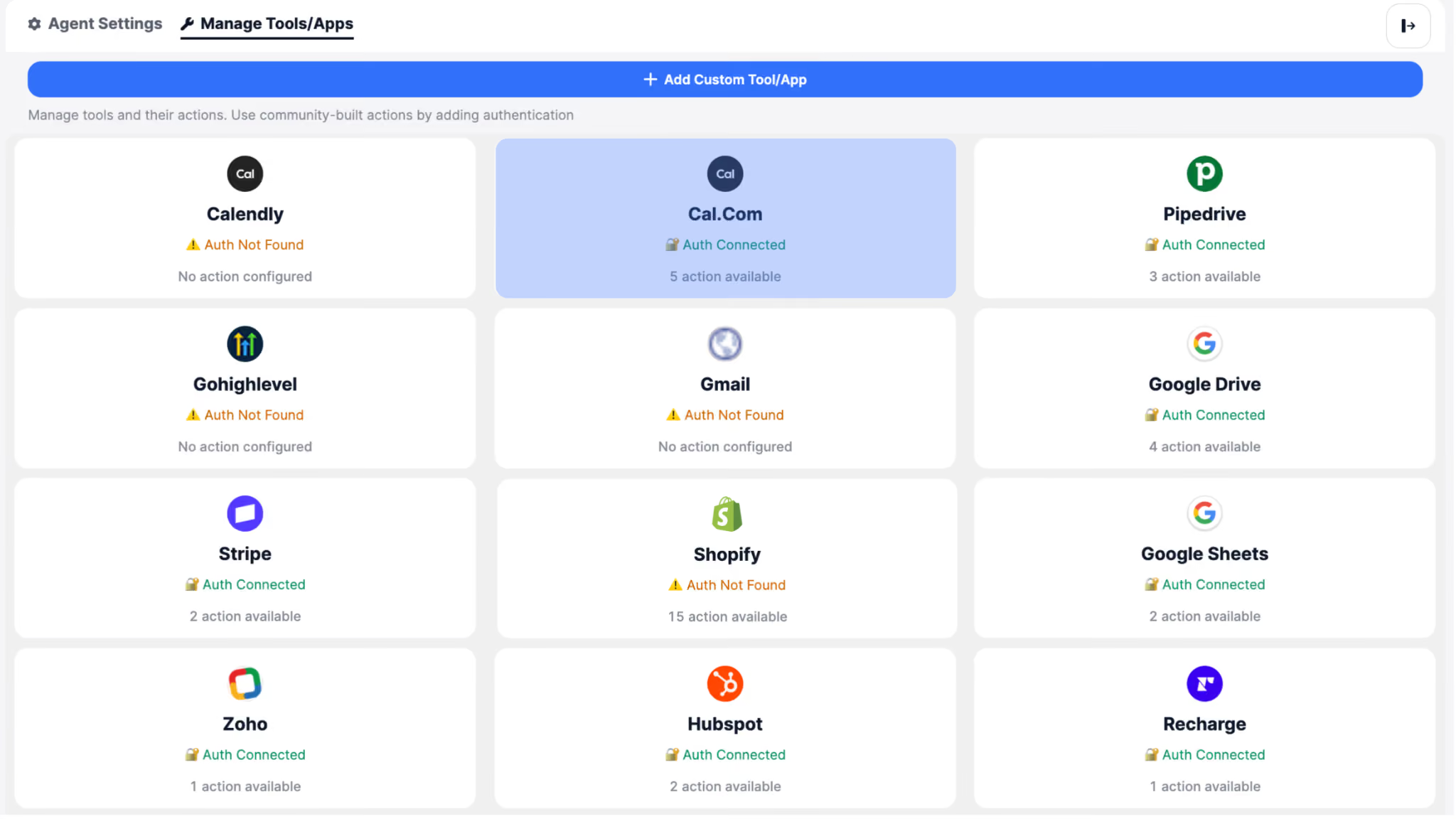
Teams can deploy voice AI agents that integrate directly with Cal.com.
Once connected via the SigmaMind App Marketplace, your voice agent can use Cal.com to:
Check Availability Live
Instead of telling someone to “check the booking link,” the agent:
- consults calendar availability
- respects time zones and booking rules
- suggests relevant time slots verbally
Example:
“We have slots for Thursday at 2pm or Friday at 10am - which works better?”
Book and Reschedule Appointments Instantly
Rather than relying on human follow-up or links that may never be clicked:
- your agent can book a meeting during the call
- reschedule existing events when needed
- update booking details
All without user friction.
Confirm and Notify Without Manual Steps
After scheduling:
- the agent confirms the meeting with the caller
- sends confirmation notifications (via your existing Cal.com setup)
- can optionally trigger reminders
Voice + scheduling works together - seamlessly.
What Are the Best Use Cases for Voice AI Scheduling with Cal.com?
1) Real-Time Demo Scheduling
When a prospect calls:
- the agent confirms what they want
- checks your demo availability
- books the session on the spot
- confirms details verbally
No links needed. No delayed follow-up. Better conversion.
2) Executive or Founder Scheduling Assistant
Your voice agent can:
- vet callers
- find a relevant time slot
- book meetings according to your rules
- avoid double-booking or back-to-back burnout
Your calendar stays intentional - without additional admin.
3) Support/Handoff Coordination
Customers who want help:
- can request a specific time verbally
- your agent schedules the right session (support call, onboarding meeting, etc.)
Speed and clarity, no email chains.
How Does Cal.com Voice AI Integration Work?
Because Cal.com is built around modular APIs and webhooks, the SigmaMind integration becomes a natural extension of your workflow:
- Connect Cal.com in the SigmaMind App Marketplace
- Authorize your account
- Use Cal.com tools in your voice agent flows
Behind the scenes, your agent can:
- call Cal.com APIs in real time
- fetch availability
- create/update events
- surface booking data during conversations
Simple. Reliable. Native to Cal.com’s architecture.
Why Does Voice AI Scheduling Matter for Modern Teams?
Cal.com users don’t just want scheduling links - they want intelligent automation that respects how people actually communicate.
Voice is where urgency, clarity, and decisions are made.
This integration turns your voice agent into a scheduling partner - not a script reader.
Your automation becomes conversational, timely, and results-oriented.
How to Connect Cal.com to Voice AI Agents
If you’re already building voice workflows with SigmaMind, open the App Marketplace and connect Cal.com in a single click.
And if you’re new here: SigmaMind lets you build production-ready Voice AI agents that can call tools, reason in real time, and take action in the systems your team cares about - without custom infrastructure.
Schedule more. Respond faster. Automate smarter.
FAQ: Cal.com Voice AI Integration
What is Cal.com voice AI integration?
It allows voice AI agents to book and manage meetings during live calls.
Can AI agents book meetings automatically?
Yes. They can check availability and confirm bookings in real time.
Does this replace scheduling links?
Yes. Conversations replace links for faster booking.
Is coding required?
No. SigmaMind enables one-click integration.
Evolve with Sigma Mind AI
Build, launch & scale AI agents
Related Blogs

Ready to transform your call center?

More Conversations.
Less Manual Work.

Building from San Francisco, CA